

Popup blocker vs ad blocker sounds like a choice between two versions of the same tool, but they work on different things. A popup blocker decides whether a page may open a new window. An ad blocker decides whether a page may load content from advertising and tracking servers. Chrome comes with the first one switched on, which is why so many people assume they already have the second.
What a popup blocker does
Chrome’s built-in blocker refuses new windows that a page tries to open without you doing anything. A timer that opens a window ten seconds after the page loads gets nothing. You can see and change this under Settings, Privacy and security, Site settings, Pop-ups and redirects, as Google’s pop-up help page describes.
What it cannot do is tell a good window from a bad one once you have clicked. A click is allowed to open a window, because that is how sign-in boxes, payment windows and “open in new tab” links work. Ad scripts know this, so they wait for your click and use it to open their own window, often behind the one you are looking at. That is the pop-under, explained in our guide to blocking pop-up ads in Chrome.
What an ad blocker does
An ad blocker works on requests rather than windows. Every ad on a page is fetched from somewhere, usually a server that belongs to an ad network. The blocker carries lists of those servers and refuses the requests, so the banner, the video ad or the tracking script never arrives. A second layer hides the empty boxes left behind.
On its own, that does nothing about a window you opened with your own click, unless the window happens to point at an address on the list.
Popup blocker vs ad blocker, side by side
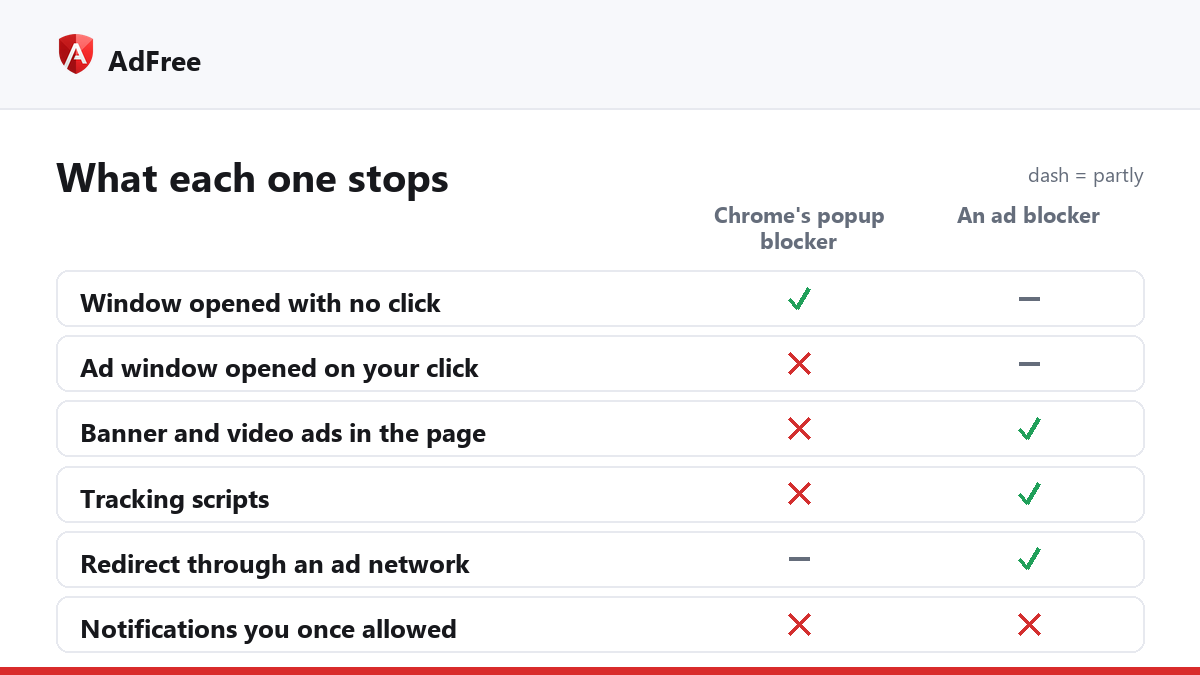
| What the page does | Chrome’s popup blocker | An ad blocker |
|---|---|---|
| Opens a window with no click | Stops it | Only if the address is on its list |
| Opens an ad window on your click | Lets it through | Only if the address is on its list |
| Shows banner and video ads in the page | Not its job | Stops most of them |
| Loads tracking scripts | Not its job | Stops known trackers |
| Redirects the tab through an ad network | Stops some, from embedded frames | Breaks the chain at the blocked address |
| Sends notifications you once allowed | No | No |
Do you need both?
Yes, and in practice the question is which ad blocker covers the gap the popup blocker leaves. A list only knows the addresses someone has already reported. A pop-under from a new address, or one built from a fake click on a link the script made itself, slips past a list.
AdFree combines both layers for that reason. Besides blocking ad and tracking requests, it adds a pop-up guard that looks at behaviour instead of addresses:
- a window opened without a click is refused;
- the first window from your click opens normally, and a second window from the same click is refused;
- a script that clicks its own link into a new tab on another site is stopped;
- your own clicks, including Ctrl+click and middle click, are never touched.
Because it counts windows rather than judging them, sign-in and payment windows keep working: they are the one window your click asked for. Some sites also redirect the whole tab instead of opening a window; our guide to ad redirects covers that variant.
What slips past both?
Ads served by the site itself from its own address, such as sponsored posts on social networks, look like ordinary content to both tools. Overlays drawn inside the page are not windows, so a popup blocker ignores them, and an ad blocker only removes them when a filter matches. Notification spam comes through the browser’s own notification system after you allowed it, which neither tool controls.
Frequently asked questions
Does a popup blocker block ads?
Only ads that open in new windows without a click. Ads inside the page are not windows, so it leaves them alone.
Does an ad blocker block pop-ups?
Some of them: the ones whose address is on its lists. A pop-up guard that counts windows per click covers the rest.
Will a stricter pop-up setting break sign-ins?
Not with one window per click. Sign-in and payment windows open one window from your click, so they pass.
Is Chrome’s built-in blocker enough on its own?
For pop-ups with no click, yes. For pop-unders, in-page ads and trackers, no.
Popup blocker vs ad blocker is not a choice: one guards windows, the other guards requests. Keep Chrome’s blocker on, and pick an ad blocker that also understands what a single click is allowed to open.
Stop paying attention to ads you never asked for
No account. No tracking. No cost.