
Ad redirects are what happens when you click a play button and land on a casino, or when the article you were reading suddenly turns into a “you have won” page. The site did not break. Something on it, usually an ad, changed where your tab was going. Chrome already stops the crudest versions, and the rest can be cut down a lot once you know which kind you are dealing with.
What an ad redirect looks like
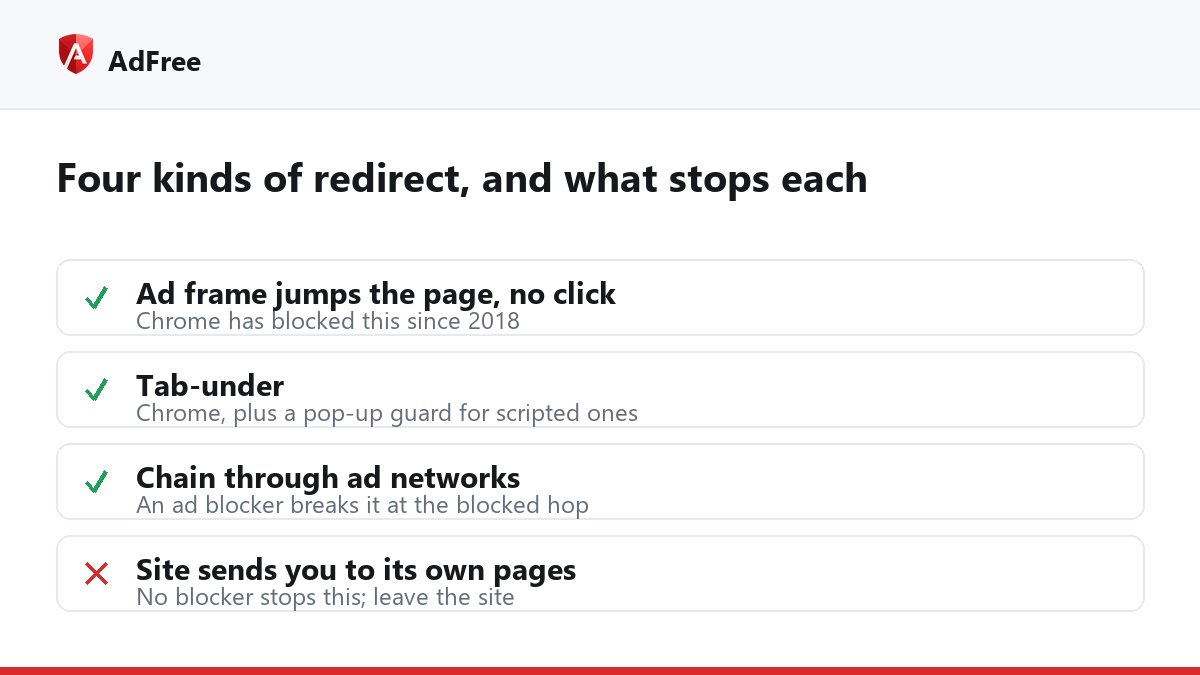
- The invisible layer. You click a link or a play button, but an invisible element covering the page catches the click and sends you to an ad. The second click usually works, which is the giveaway.
- The tab-under. The page you wanted opens in a new tab, while the tab you were on is quietly sent to an ad.
- The jump while reading. An ad inside the page changes the address of the whole tab with no click at all.
- The chain. On download and streaming sites, one click passes through several tracking addresses before landing somewhere you never chose.
What Chrome already blocks
Google announced its redirect protections in a post titled expanding user protections on the web. Since early 2018, Chrome stops an embedded third-party frame from redirecting the page unless you were interacting with it, and it detects the classic tab-under and keeps your original tab where it was. Google said then that one in five feedback reports from desktop Chrome users mentioned some kind of unwanted content.
Those protections catch the simple cases. Ad scripts have moved on: they wait for a real click and spend it on the redirect, or fake the click themselves. That is the gap the steps below close.
How to stop ad redirects
- Check Chrome’s own setting. Go to Settings, Privacy and security, Site settings, Pop-ups and redirects. Make sure the default does not allow them, and remove any site under “Allowed to send pop-ups and use redirects” that you do not trust. Google’s pop-ups and redirects help page walks through it.
- Rule out your own computer. If redirects happen on every site, including Google search and your new tab page, the cause is an extension or unwanted software, not ads. Remove extensions you did not install on purpose and follow Google’s guide to removing unwanted ads, pop-ups and malware.
- Block the ad networks. Most redirects pass through an ad network’s address. An ad blocker that refuses those addresses breaks the chain at that hop.
- Treat the worst sites as the problem. If one site redirects on every click, no setting will make it pleasant. Find the content elsewhere.
| What happens | Where it comes from | What stops it |
|---|---|---|
| Redirects on one or two sites | Ads on those sites | An ad blocker; Chrome’s redirect setting |
| Redirects on every site, even search | An extension or unwanted software | Remove it; reset Chrome’s settings |
| Your tab jumps, the page opens in a new tab | A tab-under | Chrome, plus a pop-up guard for scripted versions |
| A blank error page instead of the ad | A blocked redirect | Nothing to fix: press Back |
What does AdFree stop?
AdFree works in two ways. First, it refuses requests to known ad-network addresses, so a redirect that passes through one of them, whether from an invisible layer or a chain, stops there. When that happens you may see an error page, often with the code ERR_BLOCKED_BY_CLIENT, instead of the ad; that is the redirect being refused, and the Back button returns you to the site.
Second, its pop-up guard stops a script from clicking its own link into a new tab on another site, which is how many tab-unders start, and in Chrome and Edge it cancels the jump of your original tab that follows. It never interferes with a navigation you started yourself, and sign-in and payment redirects go through as normal.
What it does not do is stop a site from sending you to its own pages, or catch a redirect through an address that is not on its lists. Redirect-heavy pages often lead to scareware, so if you land on a page claiming your computer is infected, our guide to the fake virus alert explains how to close it safely.
Frequently asked questions
Are ad redirects dangerous?
The redirect itself is not, but where it leads can be: fake virus alerts, fake prize pages and download pages for unwanted software are common destinations.
Why does the second click work?
Many scripts spend only the first click of a visit on the redirect, then remove their invisible layer until the next page.
Will blocking redirects break sign-ins?
Not with Chrome’s setting or with AdFree. Both leave alone redirects that follow your own action, which is how sign-in and payment pages work.
Ad redirects come from a small number of tricks. Chrome handles the oldest ones, an ad blocker breaks the chains that pass through ad networks, and redirects on every site point to your own computer rather than the web.
Stop paying attention to ads you never asked for
No account. No tracking. No cost.