
Adblock on Twitch is the one place where a good ad blocker seems to stop working. The banners around the page disappear, the tracking calls go quiet, and then a pre-roll plays anyway. That is not a bug in your extension. Twitch delivers its video ads differently from almost every other site, and once you see how, it becomes clear why no blocker has a clean answer.
How Twitch delivers an ad
On a typical website, an advertisement is a separate request to a separate company. The page asks an ad server for a banner, the ad server answers, and a blocker that recognises the ad server’s address can simply refuse that request. Nothing else on the page is affected.
Twitch streams video using HTTP Live Streaming, the format Apple documents as HLS. The player downloads a short playlist every few seconds, and that playlist lists the next two-second pieces of video to fetch. When an ad break starts, Twitch writes the advertisement’s pieces into that same playlist, in place of the stream. This is called server-side ad insertion, or stitching.
From the browser’s point of view, the ad and the stream now come from the same place, through the same player, in the same format. There is no separate ad request left to refuse.
Why the usual blocking tricks fail
- Blocking the address does not work. The ad pieces are served alongside the stream. Refusing them means refusing the stream.
- Hiding the ad element does not work. The ad plays inside the video element itself; there is no separate box on the page to hide.
- Skipping the ad does not work reliably. Some extensions ask Twitch for a second, ad-free copy of the playlist and swap it in. Twitch changes its player regularly, and in our own testing this kind of swap skipped only a small share of ads while making the player stall when it switched back.
- Pre-rolls are tied to you. A pre-roll is assigned to your viewing session, so reloading the page or opening another tab usually just starts the same ad again.
What adblock on Twitch can still do
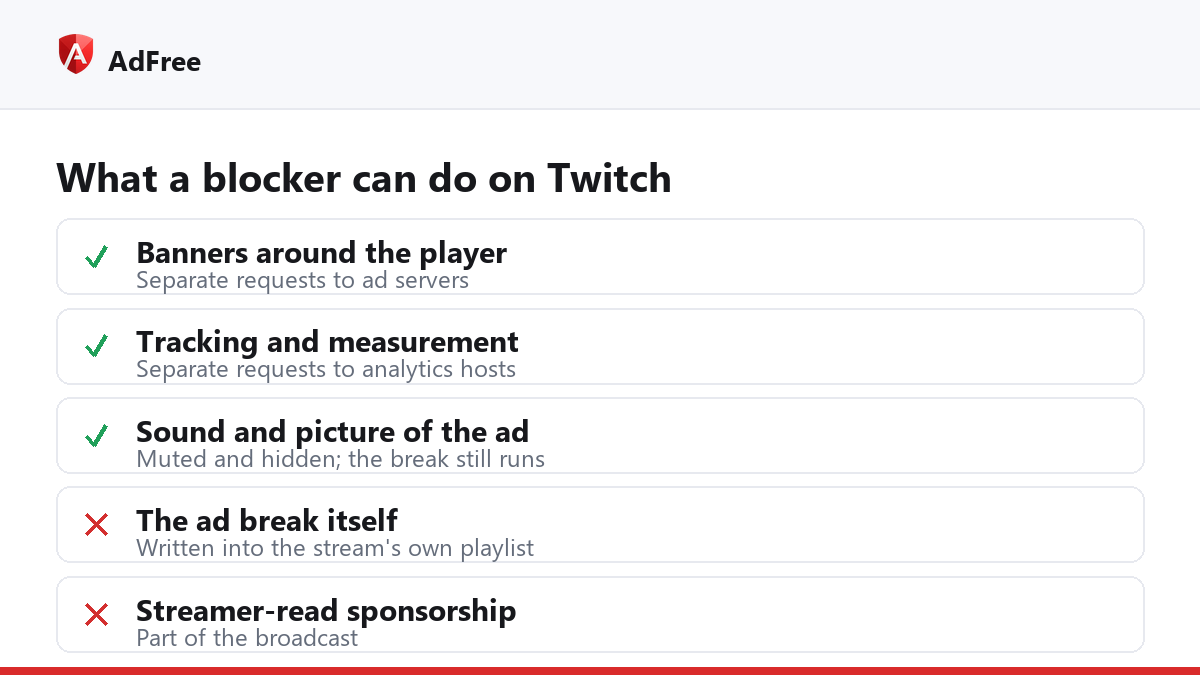
| Part of the page | Can a blocker remove it? | Why |
|---|---|---|
| Display banners around the player | Yes | Separate requests to ad servers |
| Tracking and measurement calls | Yes | Separate requests to analytics hosts |
| Sound and picture of a stitched ad | Can be muted and hidden | The player shows an ad label a script can see |
| The ad break itself | No | It is part of the stream’s playlist |
| A streamer reading a sponsorship | No | It is the broadcast |
That third row is the realistic best case. AdFree does exactly that on Twitch: while Twitch’s own ad label is on screen, it mutes the player and hides the picture, so you get a quiet black screen with Twitch’s “taking an ad break” notice instead of the ad’s sound and video. It does not remove the break or make it shorter, and we would rather say so plainly than promise otherwise. The banners and trackers around the player are blocked as normal.
Is any extension able to block Twitch ads completely?
Not reliably. Tools that claim to usually rely on the playlist swap described above, or on routing your video through a server in another country where fewer ads run. The first breaks whenever Twitch updates its player. The second means a third party sees every stream you watch and can slow your video down; read its privacy policy before trusting it with that.
If an ad blocker used to work on Twitch and stopped, that is almost always Twitch changing the player, not the extension failing. Our guide to a Twitch ad blocker not working covers the checks worth running before you assume that.
The ways that do remove Twitch ads
Twitch itself sells the only dependable route. Twitch Turbo is a paid membership that removes ads across channels, and a subscription to a single channel often includes ad-free viewing on that channel, depending on what the streamer has enabled. Both also pay the people making the streams, which an extension never does.
Between those and a blocker that mutes and hides, most viewers end up choosing based on how many channels they watch: one favourite channel makes a subscription the obvious choice; many channels make Turbo or a quiet black screen the practical one.
Frequently asked questions
Why does adblock work on YouTube but not Twitch?
YouTube still sends most ad instructions separately from the video, which gives a blocker something to act on. Twitch stitches the ad into the stream itself. YouTube has its own countermeasures, but the mechanism is different.
Why does the same ad play again after I reload?
Pre-rolls are assigned to your viewing session. A reload starts a new player in the same session, so Twitch hands you the ad it already scheduled.
Is a black screen during the break normal with AdFree?
Yes. That is AdFree muting and hiding the ad while Twitch plays it. The stream comes back on its own when the break ends.
Can using adblock on Twitch get my account banned?
We are not aware of Twitch banning accounts for using an ad blocker. It may show you a message about ad blockers or a longer break, which is a different thing from a ban.
Adblock on Twitch can clean up everything around the player and silence the break, but it cannot remove an ad that Twitch has written into the stream. Knowing that saves a lot of time spent reinstalling extensions that were never broken.
Stop paying attention to ads you never asked for
No account. No tracking. No cost.