
Of all the places an extension can struggle, live streaming is the hardest, and a Twitch ad blocker that behaved perfectly last week can start letting pre-rolls through without anything on your side changing. That is not usually a broken extension. Twitch delivers advertising in a way that is deliberately difficult to separate from the stream itself, so blocking it is an ongoing race rather than a setting you switch on once.
Why is a Twitch ad blocker harder to get right?
On a normal site, an advertisement is a separate request to a separate host. Refuse the request and the advertisement never arrives, while the article loads untouched. A live stream does not work that way: the video arrives as a continuous sequence of small segments, and advertising can be stitched into that same sequence, from the same servers, in the same format as the content.
Refusing those requests outright would refuse the stream. So blockers work around the edges instead — filtering the tracking and measurement hosts, blocking the separate ad-serving endpoints that can be identified, and handling the player’s own signals. When Twitch changes how segments are labelled, that work needs updating.
The six checks, in order
- Reload the tab. Extensions only apply to pages loaded after they were installed or updated, and a stream tab is often hours old.
- Check the site is not paused. A per-site pause switched on months ago during unrelated troubleshooting is easy to forget.
- Update the extension. Open
chrome://extensions, enable Developer mode, press Update. Most regressions are fixed upstream within days. - Confirm the site-specific list is active. A Twitch ad blocker usually ships dedicated rules separate from the general filter list; if that list can be toggled, make sure it is on.
- Try a different quality setting. Some ad-stitching behaviour differs by rendition, and switching quality forces the player to re-request the playlist.
- Rule out the mobile and TV apps. A browser extension cannot reach them at all.
What a blocker can and cannot remove
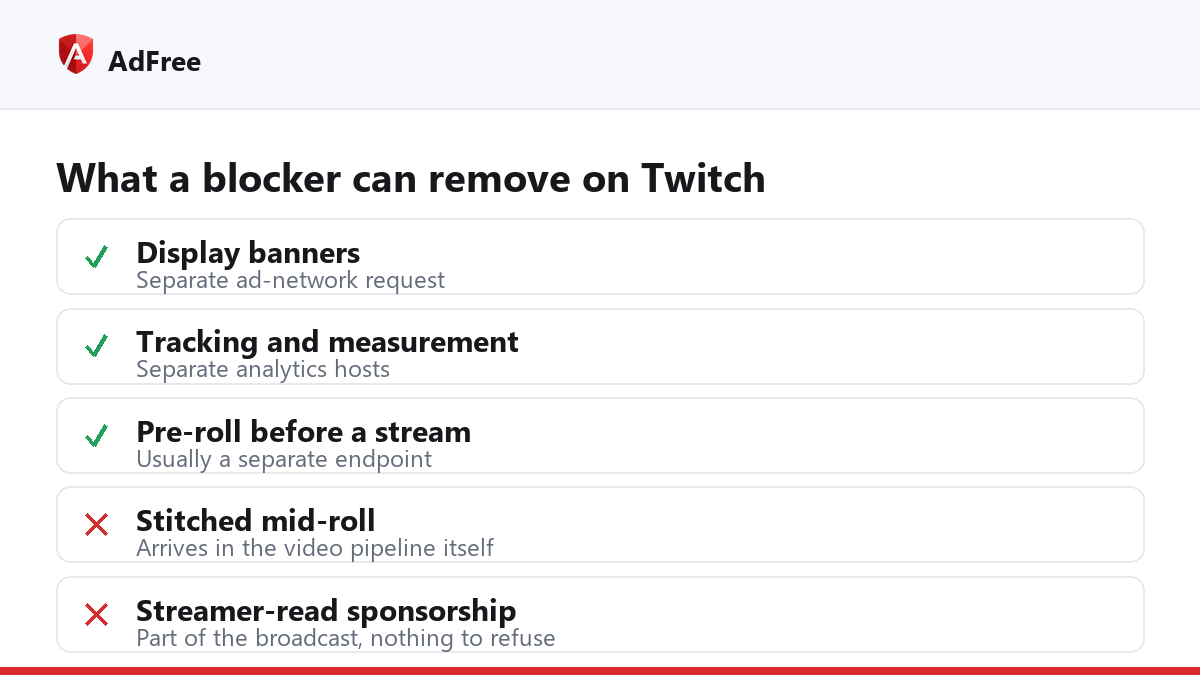
| Ad type | How it arrives | Blockable? |
|---|---|---|
| Display banners on the page | Separate ad-network request | Yes, reliably |
| Tracking and measurement | Separate analytics hosts | Yes, reliably |
| Pre-roll before a stream | Separate ad endpoint, usually | Often |
| Mid-roll stitched into segments | Same pipeline as the video | Partially, and it changes |
| Streamer-read sponsorship | Part of the broadcast itself | No |
That last row catches people out. A sponsorship the streamer reads aloud is simply part of the video; there is no request to refuse and no element to hide. Twitch describes its own advertising formats in its help documentation, which is a useful reference for what is even in scope.
Why does a purple screen appear instead of the stream?
Because a request the player needed was refused, and the player fell back to an error state rather than continuing. It is the classic sign of over-blocking on a streaming site — the blocker won, but so did the ad break, since you cannot see the stream either. A well-maintained rule set avoids this by targeting only endpoints that are safe to refuse; when it happens, updating usually resolves it, and pausing for the site restores playback in the meantime.
Is a separate extension needed just for Twitch?
No, and juggling two blockers tends to make things worse, since overlapping rules are the usual cause of a broken player. What matters is that the extension you run keeps Twitch rules as their own maintained list rather than hoping a generic filter list covers it. AdFree takes that approach — Twitch, YouTube and TikTok each get a small dedicated rule set that stays active while blocking is on, described in the user guide.
If none of the six checks help, report the channel page rather than filing a general complaint: a rule needs the exact address that produced the advertisement. Most reports of a Twitch ad blocker failing turn into a rule within an update or two, which is considerably faster than switching extensions and starting over.
Stop paying attention to ads you never asked for
No account. No tracking. No cost.