
Knowing how ad blockers work makes most of their behaviour obvious: why one ad disappears and another stays, why a page sometimes breaks, and why Twitch is so stubborn. There is no magic in it. A modern blocker does three separate jobs, each at a different moment in the life of a page, and each has its own limits.
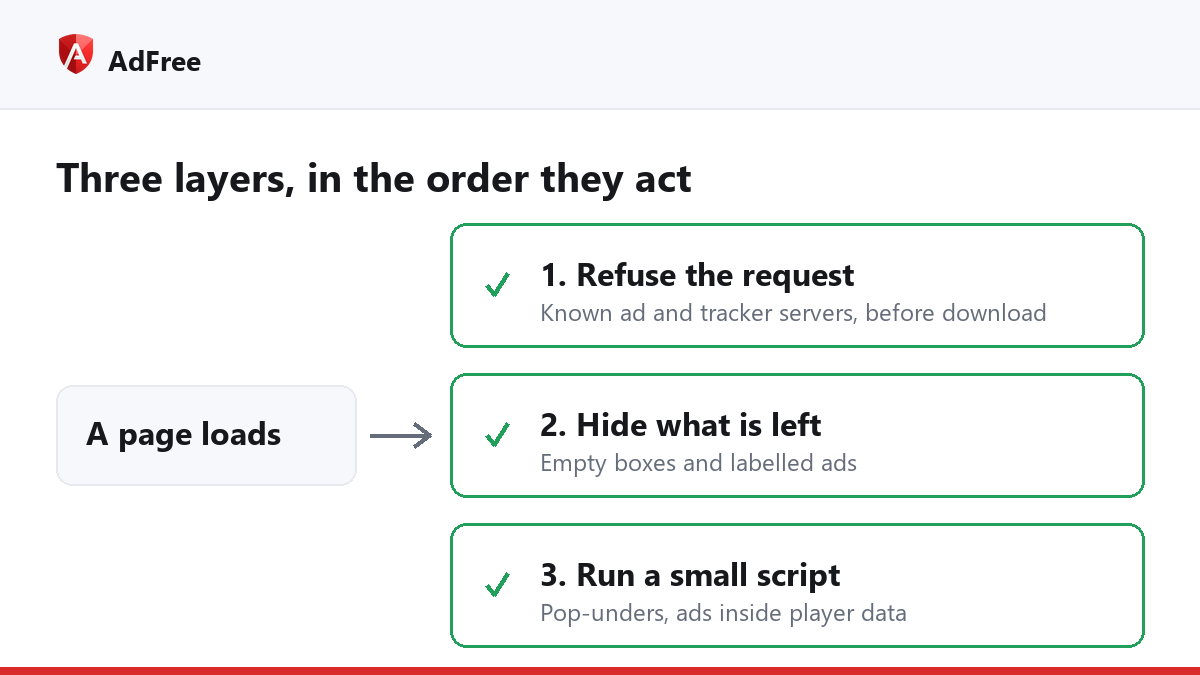
Layer 1: refusing requests
A web page is not one file. When it loads, it asks dozens of servers for scripts, images, videos and fonts. The ads are among those requests, and they usually go to servers that belong to ad networks rather than to the site you are reading.
A blocker carries lists of those addresses. In Chrome and other Chromium browsers, the extension hands its rules to the browser through the declarativeNetRequest API, and the browser itself checks each request against them before it is sent. A request that matches is never made. The ad, and anything it would have loaded after it, never arrives.
This is the layer that does most of the work, and it is also why a blocker makes pages lighter rather than heavier, which our article on whether ad blockers slow down Chrome looks at in detail.
Layer 2: hiding what is left
Refusing a request leaves an empty box where the ad would have been: a blank rectangle, or a “Sponsored” label over nothing. The second layer finds those elements on the page and hides them. Some ads also come from the site’s own server, where blocking the request would break the page, and hiding them is the only option.
This layer runs inside the page, so it is where breakage starts if a rule is too broad. A careful blocker checks that what it is about to hide is not part of the page’s own layout, such as the main column or the navigation, before hiding it.
Layer 3: scripts that change behaviour
Some ads are not separate requests or separate boxes at all. They are behaviour: a window that opens behind yours when you click, or ad instructions written into a video player’s settings. For these, a blocker runs its own small scripts in the page. Two examples from AdFree:
- The pop-up guard lets the first window from your click open and refuses a second one, and refuses windows opened with no click at all.
- The YouTube filter removes the ad instructions from the data YouTube sends to its player, so the player has no ad to show.
How ad blockers work, layer by layer
| Layer | When it acts | What it stops | Its limit |
|---|---|---|---|
| Request blocking | Before anything downloads | Ads and trackers from known servers | Only addresses on its lists |
| Element hiding | After the page is built | Empty ad boxes, some first-party ads | A broad rule can hide real content |
| Page scripts | While the page runs | Pop-unders, ads inside player data | Breaks when the site changes its code |
What no blocker can remove
All three layers depend on the ad being distinguishable from the content. When it is not, there is nothing to act on:
- Ads stitched into a video stream. Twitch writes its ads into the stream itself, which is why adblock on Twitch can mute and hide an ad break but not remove it.
- Sponsorships read by a person. A video creator’s sponsor segment is part of the video.
- Native posts on large platforms. A sponsored post that comes from the same server, in the same format as every other post, can only be hidden by a rule that recognises its label.
- Ads in apps. A browser extension works in the browser. It cannot reach a phone app or a smart TV.
Frequently asked questions
Does an ad blocker read the pages I visit?
Request rules are matched by the browser itself, and element hiding and page scripts run locally inside the page. Nothing about that requires sending your browsing anywhere; check the extension’s privacy policy to confirm it does not.
Why do ads get through after an update?
Ad networks change addresses and sites change their code. Lists catch up, but there is always a gap between the change and the new rule.
Why does the blocker need permission to “read and change” sites?
Layers 2 and 3 work inside the page. Without that permission, a blocker can only refuse requests.
That is how ad blockers work: refuse what can be refused, hide what is left, and run small scripts for the tricks that are neither. Each layer catches what the one before it missed, and none of them can remove an ad that is part of the content itself.
Stop paying attention to ads you never asked for
No account. No tracking. No cost.