
When YouTube keeps pausing with an ad blocker installed, it is tempting to blame the extension and uninstall it. Sometimes that is the right call, but more often the pause comes from YouTube itself, from a setting on your device, or from one specific trick some blockers use on ads. Each one leaves a different trace, and it takes about two minutes to work out which one you have.
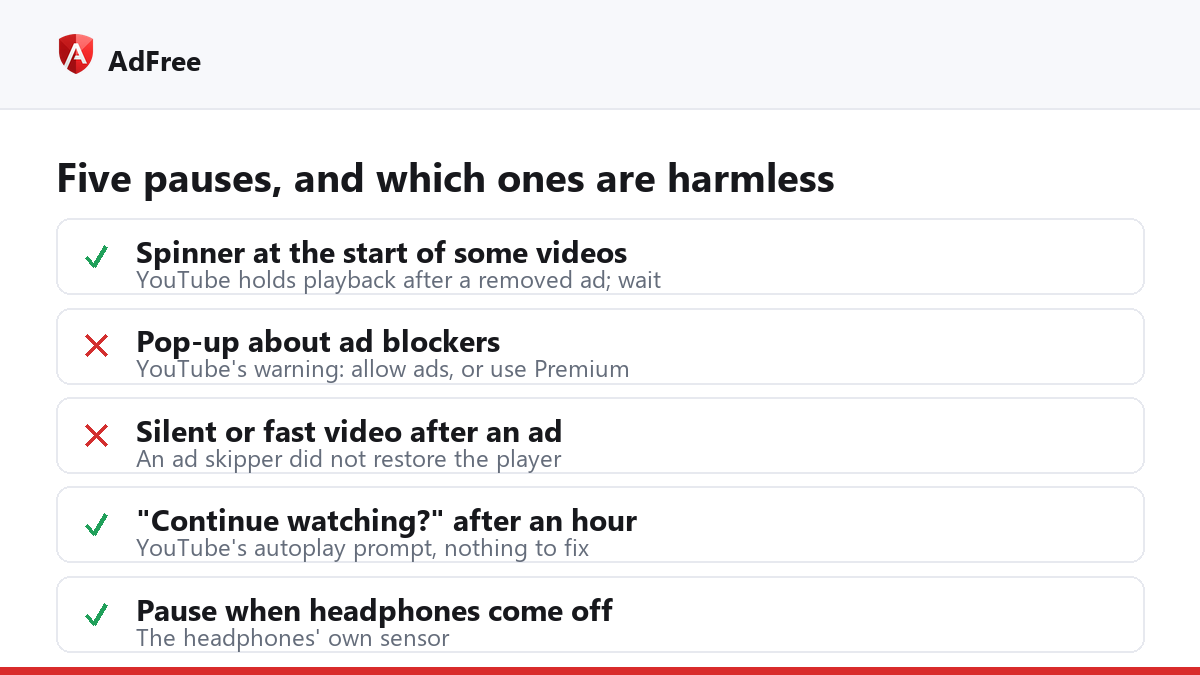
Five reasons YouTube keeps pausing
- A wait before the video starts. On a video that had an ad scheduled, YouTube can hold playback back after the ad was removed. You see a black player and a spinner, then the video starts on its own. In our own tests the wait ran from 7 to 18 seconds, and it hits every ad blocker, not one in particular.
- YouTube’s ad blocker warning. YouTube’s help page on ad blockers says it will ask you to allow ads or sign up for Premium, and that if you keep blocking, “we may block your video playback”. That shows up as a pop-up over a paused video.
- An ad skipper that leaves the video muted or sped up. Some extensions mute an ad and play it at high speed so it ends in a moment. The player reuses the same video element for the real video, so if the extension forgets to switch things back, your video plays silently or far too fast. It feels like YouTube changed the volume by itself.
- “Video paused. Continue watching?” This has nothing to do with ad blocking. YouTube’s help page on the continue watching prompt says it appears after about 60 minutes of uninterrupted autoplay on the web, to protect your watch history.
- Your headphones or another extension. Bluetooth headphones that detect being taken off send a pause to the browser, and tab-suspending or “pause in background” extensions do it on purpose.
Which one do you have?
| What you notice | Likely cause | What to do |
|---|---|---|
| Black player and spinner for a few seconds at the start, only on some videos | YouTube holding playback after a removed ad | Wait; it starts by itself |
| A pop-up about ad blockers over a paused video | YouTube’s enforcement | Allow ads on YouTube, or use Premium |
| Video plays with no sound or at double speed after an ad | An ad skipper did not restore the player | Unmute, reset the speed, then check that extension |
| “Continue watching?” after a long session | YouTube’s autoplay prompt | Click Yes; it is normal |
| Pauses when you move or take off headphones | The headphones’ own sensor | Check the headphones’ settings app |
The quickest test is the one YouTube’s own playback troubleshooting page suggests: open the same video in a window with extensions turned off. If it plays straight through there, an extension is involved; switch them back on one at a time to find which. If it still pauses, look at your device, your network and your headphones instead.
What does AdFree do on YouTube?
AdFree removes the ad from what YouTube sends to the player, so on most videos no ad appears at all. That is also what triggers the start-up wait from point 1, and we would rather say so than hide it: when a video is being held back, AdFree puts one short line over the player explaining that the wait comes from YouTube, and the line disappears the moment the video starts.
If an ad still reaches the player, AdFree mutes it and runs it at high speed, the trick from point 3. Before it does that, it saves the mute setting and the playback speed you had, and it puts both back as soon as the ad ends, so the video you chose plays the way you left it. AdFree never pauses a video. A pause in the middle of a video has one of the other causes on the list.
Can the start-up wait be removed?
Not reliably by any extension that goes through store review. The wait is decided on YouTube’s side, and YouTube changes how it works often. Your dependable choices are:
- accept the wait, which is shorter than the ad it replaces;
- allow ads on YouTube in your blocker, so videos start at once and you watch the ad;
- pay for YouTube Premium, which removes ads and pays creators.
If ads are getting through instead of the video stalling, that is a separate problem with its own checklist; see YouTube ads still showing with an ad blocker.
Frequently asked questions
Why does the wait happen on some videos and not others?
Only videos that had an ad scheduled for you are held back. A video with no ad slot starts at once, with or without a blocker.
Why does YouTube say “Experiencing interruptions?”
That message comes from YouTube, not from your extension. It appears during the start-up wait and links to YouTube’s help page about ad blockers.
Can YouTube close my account for using an ad blocker?
YouTube’s help page talks about warnings and blocking playback. It does not mention closing accounts for ad blocking.
My video is suddenly silent. Is that my ad blocker?
Possibly. Check whether the tab or the player is muted and whether the speed is still 1x. If it happens right after ads, an ad skipper is not restoring the player.
If YouTube keeps pausing, start by matching what you see to the table above. A short wait at the start is YouTube’s doing, a pop-up is YouTube’s warning, silence after an ad points to an extension, and a pause after an hour is just YouTube asking whether you are still there.
Stop paying attention to ads you never asked for
No account. No tracking. No cost.