

Chrome has shipped a pop-up blocker since 2008, and it is switched on by default. So when a window still lands on top of the article you were reading, the natural conclusion is that the setting is broken. It usually isn’t. Chrome’s blocker was built to stop windows that open by themselves, and the advertising industry moved on from that a long time ago. If you want to block pop-up ads in 2026, it helps to know exactly which layer stops which trick.
Why Chrome’s own blocker misses so much
Chrome’s rule is simple: a site may open a new window if a real user gesture asked for it. Click a link, get a window. No click, no window. That single rule killed the 2000s-era pop-up, which fired on a timer as the page loaded.
Modern ad networks satisfy the rule instead of fighting it. You click anywhere on the page — a play button, a download link, a blank area wired up with a listener — and the script opens two windows: the one you asked for, plus an advertising window that Chrome now considers user-initiated. The second one is often pushed behind the current window, which is why it is called a pop-under and why you find it half an hour later.
The three kinds of pop-up you actually meet
- Timer pop-ups. Open with no click at all. Chrome already stops these, and so does every blocker.
- Click-hijacked pop-unders. One click, two windows. Chrome allows them, because from the browser’s point of view you asked for it.
- In-page overlays. Not real windows at all — a
divdrawn over the article with a hard-to-hit close button. No window blocker of any kind touches these; they are stopped by filtering the ad request or hiding the element.
How do you block pop-up ads that open on a click?
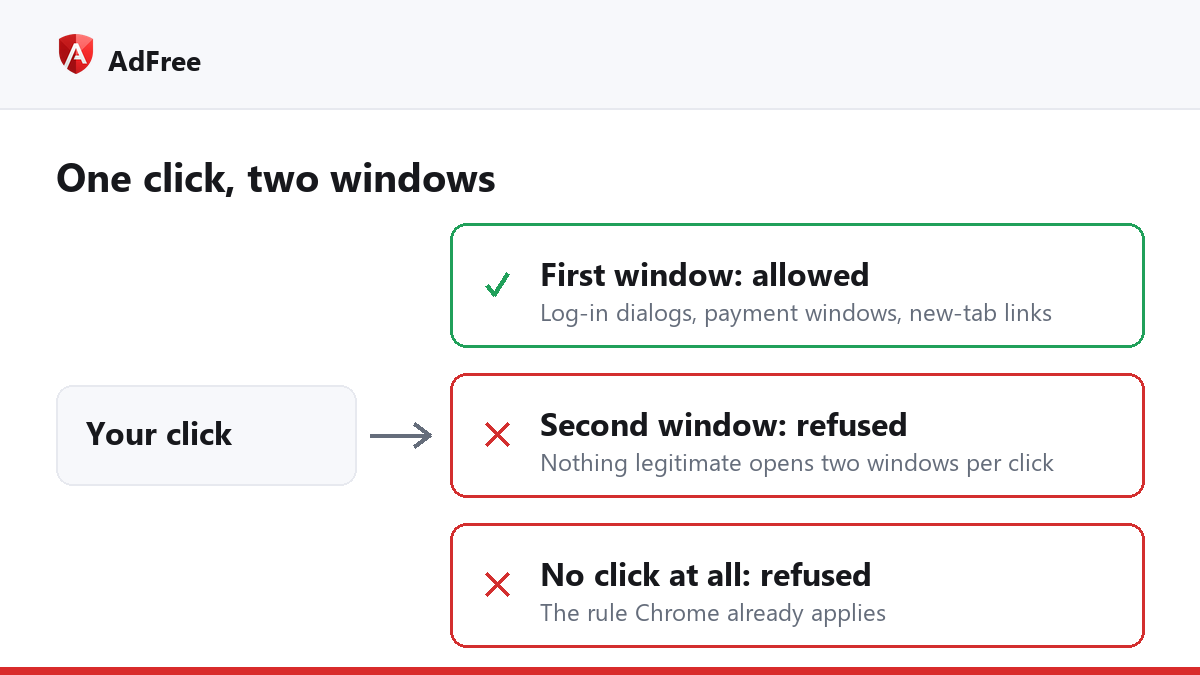
This is the case Chrome’s setting leaves open, and it is the one an extension can close. The approach that does not break the web is to count windows per gesture rather than ban them outright:
- Let the first window from a genuine click through. That is your bank’s payment window, the “Sign in with Google” dialog, and every
target="_blank"link you deliberately opened. - Refuse the second window from the same click. Nothing legitimate needs to open two windows from one press.
- Refuse any window opened without a recent gesture, which is Chrome’s original rule.
- Block the known pop-under networks at the request level, so the script that would have opened the window never loads.
That last point matters more than it sounds. Roughly thirty advertising networks account for most of the pop-unders on the web, and blocking their hostnames removes the problem before any window logic is involved.
Chrome’s setting versus an extension
| Behaviour | Chrome setting | Blocking extension |
|---|---|---|
| Window opened on a timer | Blocked | Blocked |
| Second window from one click | Allowed | Blocked |
| Pop-under network scripts | Allowed | Blocked at request level |
| In-page overlay advertising | Allowed | Filtered or hidden |
| Bank and log-in windows | Allowed | Allowed |
Chrome’s own controls live under Settings, then Privacy and security, then Site settings, then Pop-ups and redirects — Google documents them in its pop-up help page. Leave that setting on. It costs nothing and it still handles the oldest category.
Does blocking pop-ups break log-ins?
It shouldn’t, and if it does, the blocker is too blunt. A sign-in dialog, a payment window and an “open in new tab” link are all single windows from a real click, so a guard built around the one-window-per-gesture rule leaves them alone. The blockers that do cause trouble are the ones that refuse window.open outright.
If a site you trust does misbehave, the fix is not to uninstall anything. AdFree can be paused for a single site from its toolbar popup, which stops blocking there and nowhere else. The user guide walks through that in a few clicks.
Why do pop-ups still open after I install a blocker?
Three ordinary reasons, in order of likelihood. The tab was loaded before the extension was installed or updated, so reload it once. The window is not a window at all but an in-page overlay, which needs a filter rule rather than a window guard. Or the network is new and no rule covers it yet — that is what a report button is for, and reported pages become rules in the next update.
Are pop-under ads worth worrying about?
Beyond the annoyance, yes. Pop-under inventory is cheap, sells to whoever pays, and is a standard delivery route for fake virus warnings, tech-support scams and browser-locker pages. Removing the window removes the delivery route, which is a security improvement rather than a cosmetic one.
The practical summary: keep Chrome’s setting on for the old-style pop-ups, and add a guard that understands clicks if you want to block pop-up ads that arrive through a hijacked gesture. Between the two, the web gets quiet again without anything legitimate breaking.
Stop paying attention to ads you never asked for
No account. No tracking. No cost.