
It is a reasonable worry: you install software that inspects every page you open, so surely something has to give. The short answer is that on today’s extension platform, ad blockers slow down Chrome far less than the advertising they remove does — and on a heavy page the net effect is usually a browser that feels faster. The longer answer is worth having, because the reasons changed significantly with Manifest V3.
What Manifest V3 changed
Under the old platform, a blocker registered a listener and Chrome handed it every network request to inspect. That meant a round trip into JavaScript for every image, script and font on every page — real overhead, and the reason the old benchmarks were unflattering.
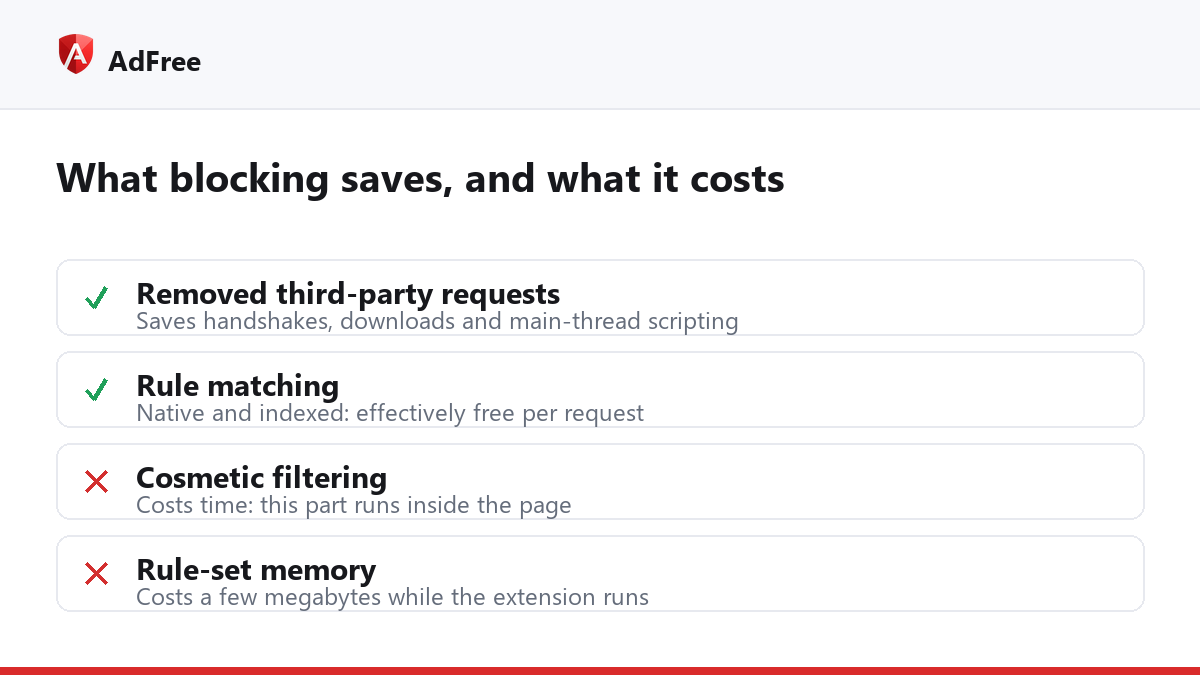
Manifest V3 replaced that with a declarative model. The extension hands Chrome a list of rules once, and Chrome matches them internally in native code. There is no per-request excursion into extension JavaScript. Google documents the mechanism in its declarativeNetRequest reference, and the practical consequence is that the matching cost is now roughly the cost of a hash lookup per request.
Where the remaining cost actually sits
- Memory. The rule set has to live somewhere. A few thousand rules is a few megabytes — noticeable on a very low-end machine, invisible on anything modern.
- Cosmetic filtering. Hiding leftover ad containers happens in the page, in JavaScript. This is the part that still costs measurable time, and it scales with how aggressive the hiding rules are.
- Start-up. Rules are loaded when the extension starts. A blocker that rewrites its whole rule set on every settings change pays this repeatedly; one that uses static rule sets pays it once.
Do ad blockers slow down Chrome in practice?
Measured on real pages, the arithmetic runs the other way. A typical ad-supported news article makes dozens of requests to advertising and tracking hosts, each of which costs a DNS lookup, a TLS handshake, a download and then script execution on the main thread. Removing them removes all of that work. The blocker’s own cost is a rule match per request; the advertising’s cost is entire scripts that run, measure, and request more scripts.
| Page type | Effect of blocking | Why |
|---|---|---|
| Ad-heavy news site | Clearly faster | Dozens of third-party requests removed |
| Video platform | Faster to first frame | Pre-roll requests never made |
| Web app you log into | No measurable change | Little or no third-party advertising |
| Static documentation | No measurable change | Nothing to block |
| Very low-memory device | Slight memory cost | Rule set must be resident |
How do I measure it myself?
Do not trust a general claim, including this one — the answer depends on the sites you visit. Open Chrome’s DevTools, switch to the Network panel, tick “Disable cache” and load a page you actually read. Note the request count and the finish time. Then pause the blocker for that site, reload, and compare. On an ad-supported site the difference in request count is usually stark, and the finish time follows it.
For a second opinion, the Performance panel shows main-thread scripting time, which is where advertising does most of its damage — a page can finish loading quickly and still feel sluggish because ad scripts are busy long after that.
Does the number of filter lists matter?
Some, but less than people expect. Doubling the rule count barely changes match time in a declarative engine, because matching is indexed rather than sequential. What does matter is cosmetic rules, which run in the page. If you want a lean setup, switch off the lists that cover languages and regions you never browse rather than trimming rules at random. AdFree exposes its lists individually for that reason, and the user guide explains what each one covers.
So the honest summary is not that ad blockers slow down Chrome or that they magically accelerate it: they move work. You trade a small, predictable matching cost for the removal of a large, unpredictable amount of third-party JavaScript, and on the pages where that trade matters, it is not close.
Stop paying attention to ads you never asked for
No account. No tracking. No cost.